Nimvo
Control your Mac from iPhone, with an adaptive workspace for iPhone Duo.
Screens
Get started
Use the remote
Control your Mac from your phone
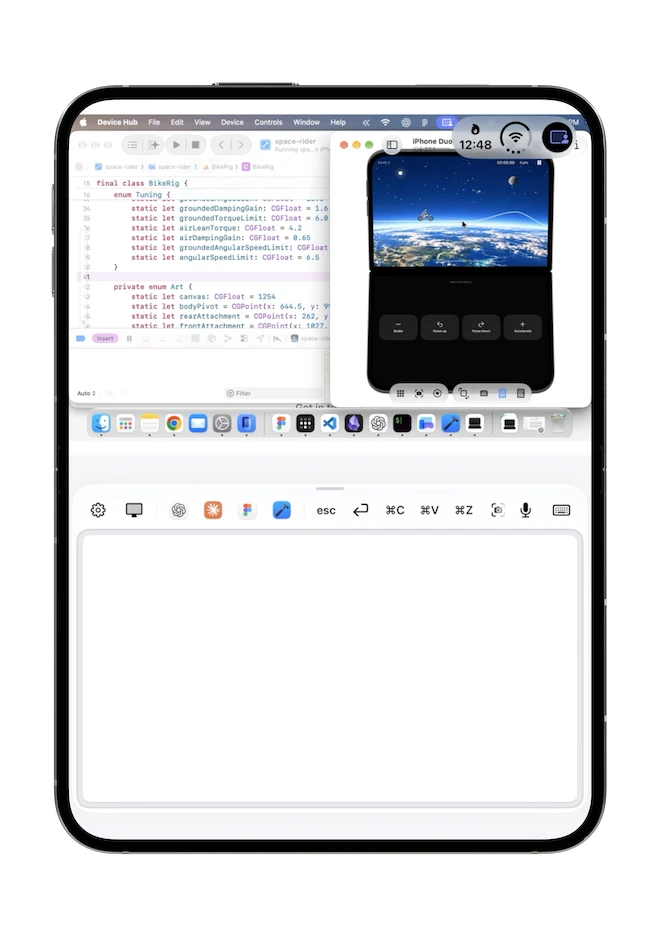
Check an AI conversation, make a quick change in a video project, or open the browser without returning to your desk. Nimvo puts your Mac desktop above familiar controls on your iPhone or iPad, with layouts that adapt to regular iPhone screens and different iPhone Duo poses.
This is a native SwiftUI project with two apps: the mobile remote and Nimvo Companion for Mac. Your devices connect over the same local network. The Mac stays awake and signed in; there is no internet relay or account to set up.
What is inside
- Desktop control: live Mac screen sharing, pinch to zoom, scrolling, clicks, and dragging with the trackpad.
- A full keyboard: familiar Mac keys, held-key combinations, and configurable shortcuts to installed Mac apps.
- Reviewed dictation: on-device transcription into an editable draft. Send it with Type on Mac when it is ready.
- Local pairing: QR setup, authenticated encrypted transport, Keychain credentials, and explicit Mac screen and input permissions.
- A paid utility flow: benefit-led onboarding, a localized one-time price, and StoreKit 2 purchase and restore handling.
What you can learn
Follow a screen frame from ScreenCaptureKit on the Mac through Network.framework to the phone. Explore how the app bounds streaming work, forwards pointer and keyboard events, and releases held input when a connection ends.
The speech flow uses Apple's SpeechAnalyzer and SpeechTranscriber, including model preparation, provisional results, interruption handling, and review before sending. The repository also includes focused tests, release checks, and verification notes.
Run it
- Clone the private repository and open in Xcode 27.1 or later.
- Build the DuoCompanion scheme for Mac and the Duo scheme for iPhone or iPad. Select your own development team for device builds.
- Install the companion in Applications, allow Screen Recording and Accessibility, and pair both devices on the same local network.
The apps require iOS 26 and macOS 26 or later. iPhone Duo fold APIs require iOS 27.1; earlier systems use the adaptive geometry fallback. Signing credentials are not included.
Included with Pro
Pro members get the complete Nimvo source through the private Code with Beto GitHub organization, alongside the other premium projects and courses. Pro source-code access and the consumer app purchase are separate: you do not need Pro to use the released app.
Get Started Today
Pro members can use Visit repo above. For access questions or feedback, email beto@codewithbeto.dev.
Give your agent real apps to learn from.
Your agent reads real app source and adapts it to your project. Free covers our blog, guides, skills, screens, and Oyelo. Pro adds every lesson and codebase.
Sign in
Use Google or GitHub and copy your MCP setup from your profile.
Connect your agent
Paste it once into your MCP client.
Ask about real code
Try “How does Oyelo keep audio playing in the background?”