Oyelo
Save articles, organize your reading, and listen in a native iPhone library.
Screens
Welcome to Oyelo
Import and narrate
Organize the library
Follow blogs
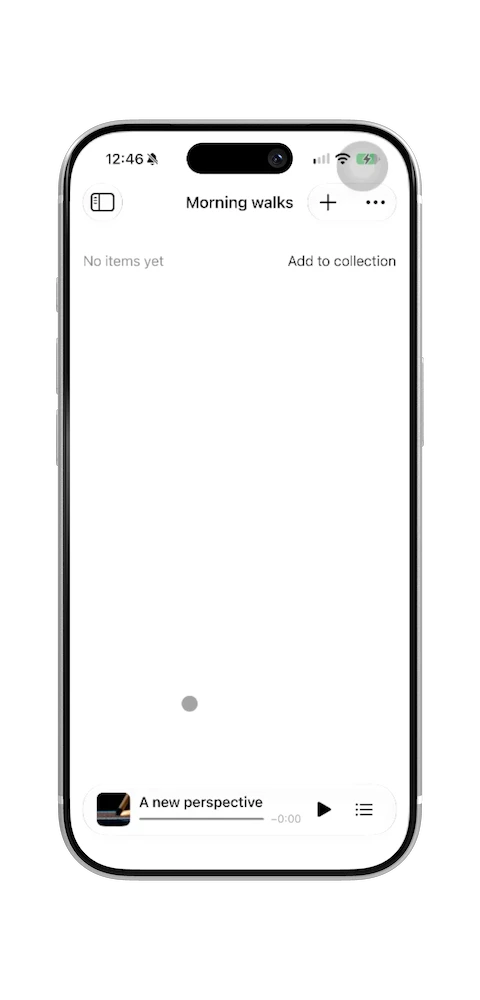
Listen and manage the queue
Settings, activity, and backup
Build a reading library
Build Oyelo's features into your app
Copy a prompt and paste it into Claude Code, Codex, or Cursor with the Code with Beto MCP connected. Your agent reads the Oyelo source and adapts the feature to your project. A free account is enough.
Achievements system
20 achievements with progress bars, from the first saved article to 50 hours of listening and 30 days of listening.
See the prompt
Use the Code with Beto MCP (template: oyelo) to study Oyelo's code for this feature: Achievements system. Start with Oyelo/Core/AchievementStore.swift, Oyelo/Features/AchievementsView.swift, Oyelo/App/AchievementPresentation.swift, and use search_template_code or list_template_files if you need more. Then build an achievements system for my app, with a screen that shows progress toward each one and a celebration when one unlocks. Read my project first and follow its architecture, naming, and style. If my app isn't SwiftUI, translate the approach to my stack instead of copying the code. Before you write code, tell me in a few lines what you'll build and which files you'll change. Pick achievements that match what people do in my app instead of copying Oyelo's list. Like Oyelo, unlock one only after the action actually succeeded, and keep achievement progress when the user deletes content.
Import from the share sheet
A Share Extension that saves a link from Safari or any app into a shared inbox that the main app imports.
See the prompt
Use the Code with Beto MCP (template: oyelo) to study Oyelo's code for this feature: Import from the share sheet. Start with OyeloShare/ShareViewController.swift, Shared/ShareInbox.swift, Oyelo/Import/ShareInboxProcessor.swift, and use search_template_code or list_template_files if you need more. Then build a Share Extension so people can send links or text to my app from the iOS share sheet. Read my project first and follow its architecture, naming, and style. If my app isn't SwiftUI, translate the approach to my stack instead of copying the code. Before you write code, tell me in a few lines what you'll build and which files you'll change. Walk me through the new target, the App Group, and the entitlements I have to add in Xcode, since you can't do those for me. Keep the extension small and do the heavy work in the main app, the way Oyelo's share inbox does.
Article extraction from a URL
Turns a web page into clean article text with a title and images, using Readability.
See the prompt
Use the Code with Beto MCP (template: oyelo) to study Oyelo's code for this feature: Article extraction from a URL. Start with Oyelo/Import/ArticleImporter.swift, Oyelo/Import/HTMLArticleExtractor.swift, Oyelo/Import/Resources/ArticleExtraction.js, and use search_template_code or list_template_files if you need more. Then build a way to paste or share a URL and get the article's clean text, title, and main image. Read my project first and follow its architecture, naming, and style. If my app isn't SwiftUI, translate the approach to my stack instead of copying the code. Before you write code, tell me in a few lines what you'll build and which files you'll change. Keep Readability's license file if you bundle it. Handle pages that fail to load or have no article, and show the user what went wrong.
Background audio and Now Playing
Audio that keeps playing with the screen locked, with Lock Screen controls, interruptions, and saved position.
See the prompt
Use the Code with Beto MCP (template: oyelo) to study Oyelo's code for this feature: Background audio and Now Playing. Start with Oyelo/Playback/PlaybackController.swift, Oyelo/Features/SystemPlaybackControls.swift, and use search_template_code or list_template_files if you need more. Then build background audio playback with Lock Screen and Control Center controls. Read my project first and follow its architecture, naming, and style. If my app isn't SwiftUI, translate the approach to my stack instead of copying the code. Before you write code, tell me in a few lines what you'll build and which files you'll change. Cover the audio session setup, the background mode in Info.plist, remote commands, Now Playing info, and what happens on a phone call or when headphones disconnect. Save the playback position so people can pick up where they left off.
Home Screen widget with buttons
A configurable widget that shows recent items and plays them from the Home Screen with App Intents.
See the prompt
Use the Code with Beto MCP (template: oyelo) to study Oyelo's code for this feature: Home Screen widget with buttons. Start with OyeloActivity/OyeloRecentPlaybackWidget.swift, Shared/PlaybackIntents.swift, Shared/LibraryWidgetSnapshot.swift, and use search_template_code or list_template_files if you need more. Then build a Home Screen widget that shows my app's most relevant content and has a button that acts without opening the app. Read my project first and follow its architecture, naming, and style. If my app isn't SwiftUI, translate the approach to my stack instead of copying the code. Before you write code, tell me in a few lines what you'll build and which files you'll change. Explain the widget extension target and the App Group I need to create in Xcode. Share data with the widget through a small snapshot like Oyelo does, not the whole database, and refresh the timeline when that data changes.
Transcript that follows the audio
Shows the text being read in short phrases, highlights the current one, and seeks when you tap a phrase.
See the prompt
Use the Code with Beto MCP (template: oyelo) to study Oyelo's code for this feature: Transcript that follows the audio. Start with Oyelo/Features/PlayerLyricsView.swift, Oyelo/Features/PlayerTranscript.swift, and use search_template_code or list_template_files if you need more. Then build a transcript view that scrolls with the audio, highlights the current phrase, and jumps to a phrase when tapped. Read my project first and follow its architecture, naming, and style. If my app isn't SwiftUI, translate the approach to my stack instead of copying the code. Before you write code, tell me in a few lines what you'll build and which files you'll change. If my audio has no word timestamps, estimate timing per section the way Oyelo does and say so in the code. Respect Reduce Motion and large Dynamic Type sizes.
One-time Pro purchase
A StoreKit 2 one-time unlock with no server or account, including Ask to Buy, refunds, and a local test file.
See the prompt
Use the Code with Beto MCP (template: oyelo) to study Oyelo's code for this feature: One-time Pro purchase. Start with Oyelo/Core/ProStore.swift, Oyelo/Features/ProView.swift, Oyelo.storekit, and use search_template_code or list_template_files if you need more. Then build a one-time in-app purchase that unlocks Pro features, with a paywall screen and Restore Purchases. Read my project first and follow its architecture, naming, and style. If my app isn't SwiftUI, translate the approach to my stack instead of copying the code. Before you write code, tell me in a few lines what you'll build and which files you'll change. Use current entitlements as the source of truth and treat any cached flag only as a way to avoid flicker at launch. Add a StoreKit configuration file so I can test purchases in the simulator, and tell me what to create in App Store Connect.
Alternate app icons
Six Home Screen icons people can choose from in settings, made as Icon Composer variants.
See the prompt
Use the Code with Beto MCP (template: oyelo) to study Oyelo's code for this feature: Alternate app icons. Start with Oyelo/Features/AppIconView.swift, and use search_template_code or list_template_files if you need more. Then build a settings screen where people choose an alternate app icon. Read my project first and follow its architecture, naming, and style. If my app isn't SwiftUI, translate the approach to my stack instead of copying the code. Before you write code, tell me in a few lines what you'll build and which files you'll change. Tell me which icon files and build settings I need to add, and use a preview image for each choice because iOS can't draw an alternate icon in the app. Show an error if the change fails.
API keys in the Keychain
Saves each provider's API key in the Keychain on this device only, with a screen to add, check, and remove it.
See the prompt
Use the Code with Beto MCP (template: oyelo) to study Oyelo's code for this feature: API keys in the Keychain. Start with Oyelo/Core/KeychainStore.swift, Oyelo/Features/ProviderKeyEntryView.swift, and use search_template_code or list_template_files if you need more. Then build secure storage for API keys or tokens the user enters, with a screen to add, replace, and delete them. Read my project first and follow its architecture, naming, and style. If my app isn't SwiftUI, translate the approach to my stack instead of copying the code. Before you write code, tell me in a few lines what you'll build and which files you'll change. Store secrets in the Keychain, never in UserDefaults or plain files, and keep them on this device. Never log a key or show it in full after it's saved.
Listen-later reminders
Schedules a local notification for an item and opens that item when the user taps it.
See the prompt
Use the Code with Beto MCP (template: oyelo) to study Oyelo's code for this feature: Listen-later reminders. Start with Oyelo/Core/ReminderStore.swift, Oyelo/Features/ReminderView.swift, Oyelo/App/ArticleNotificationRouter.swift, and use search_template_code or list_template_files if you need more. Then build reminders that schedule a local notification for an item and open that item when tapped. Read my project first and follow its architecture, naming, and style. If my app isn't SwiftUI, translate the approach to my stack instead of copying the code. Before you write code, tell me in a few lines what you'll build and which files you'll change. Ask for notification permission only when the user sets their first reminder. Like Oyelo, read scheduled reminders from the notification center instead of keeping a second list that can get out of sync.
Ask for a review at the right time
Requests an App Store review after a good moment, at most once per version and every 120 days.
See the prompt
Use the Code with Beto MCP (template: oyelo) to study Oyelo's code for this feature: Ask for a review at the right time. Start with Oyelo/App/ReviewPromptPolicy.swift, and use search_template_code or list_template_files if you need more. Then build an App Store review request that runs after a good moment in my app. Read my project first and follow its architecture, naming, and style. If my app isn't SwiftUI, translate the approach to my stack instead of copying the code. Before you write code, tell me in a few lines what you'll build and which files you'll change. Find the moment in my app that matches Oyelo's (right after a favorite is saved). Limit requests to once per version and add a minimum gap between them, and add tests for that rule.
Follow blogs with background refresh
Follows RSS and Atom feeds and checks them for new posts with a background task.
See the prompt
Use the Code with Beto MCP (template: oyelo) to study Oyelo's code for this feature: Follow blogs with background refresh. Start with Oyelo/Core/FeedStore.swift, Oyelo/Import/FeedParser.swift, Oyelo/App/FeedBackgroundRefresh.swift, and use search_template_code or list_template_files if you need more. Then build a way to follow feeds or a remote source and check it for new items in the background. Read my project first and follow its architecture, naming, and style. If my app isn't SwiftUI, translate the approach to my stack instead of copying the code. Before you write code, tell me in a few lines what you'll build and which files you'll change. Register the background task at launch and add its identifier to Info.plist. iOS decides when it runs, so don't promise exact timing, and cancel network work when the task expires.
Keep up with what matters, on your terms
Save an article worth your attention. Listen on a walk, during a workout, or as you wind down. Oyelo turns the reading you choose into a private audio library, with a voice and provider you control.
The app is free to use with your own ElevenLabs, OpenAI, or Google Gemini API key. Providers charge separately for generation. There is no Oyelo account or shared audio catalogue.
Oyelo is in beta. This is a native SwiftUI project for iOS 26 and later. Anyone with a free Code with Beto account can explore the source through the Code with Beto MCP: your coding agent can browse, search, and read it for you. Pro members can also clone the full repository.
What is inside
- Import and review: a Share Extension, article extraction, pasted text, duplicate detection, and review before creating audio.
- Provider integration: device-only Keychain credentials, separate voice/model choices, streaming downloads, and saved generation checkpoints.
- Everyday listening: offline audio, playback speed, chapters, an Up next queue, sleep timers, and listen-later reminders.
- Native system surfaces: Now Playing, Home Screen widgets, interactive Live Activities, and adaptive Library/detail navigation.
- A personal library: editable titles and symbols, favorites, generation history, listening stats, and optional device-backup eligibility.
- A first listen without setup: an original Mars fact narrated with OpenAI Nova and bundled for offline playback.
What you can learn
Follow an article from a share-sheet import to a saved narration. See how the app separates extraction, optional text preparation, speech generation, and playback so that changing a title does not regenerate audio or lose your place.
The code also covers the less visible work: recovering saved sections, avoiding automatic retries after an uncertain paid request, preserving a Live Activity during a cold playback intent, and distinguishing reported provider usage from unavailable billing information.
The repository includes unit and UI tests, verification notes, and a small React/Vite landing page. The notes identify remaining device checks; neither a Live Activity nor a background task guarantees unlimited generation time on iOS.
Run it
- Clone the private repository and open in Xcode 27.1 or later.
- Select the Oyelo scheme and an iPhone simulator, then build and run.
- Try the bundled Nova sample. Add your own provider key when you want to create audio from your reading.
For a physical device, select your development team and configure the documented bundle IDs and App Group. Provider keys and signing credentials are not included.
Free with the MCP, complete with Pro
Free account: connect the Code with Beto MCP from your profile and ask your agent about Oyelo's code, for example "How does Oyelo keep audio playing in the background?", or copy one of the feature prompts to build an Oyelo feature into your own app. No GitHub link is needed.
Pro: clone the complete Oyelo repository through the private Code with Beto GitHub organization, alongside every other premium project, course, and the full MCP.
The listening app is separate from both: you don't need an account or Pro to use Oyelo.
Get Started Today
Already a Pro member? Use Visit repo above. For access questions or feedback, email beto@codewithbeto.dev.
Give your agent real apps to learn from.
Your agent reads real app source and adapts it to your project. Free covers our blog, guides, skills, screens, and Oyelo. Pro adds every lesson and codebase.
Sign in
Use Google or GitHub and copy your MCP setup from your profile.
Connect your agent
Paste it once into your MCP client.
Ask about real code
Try “How does Oyelo keep audio playing in the background?”